Model Context Protocol: The Future of Enterprise AI Integration
What Model Context Protocol (MCP) is, how its host, client and server architecture works, and how enterprises can adopt it securely for AI agents.
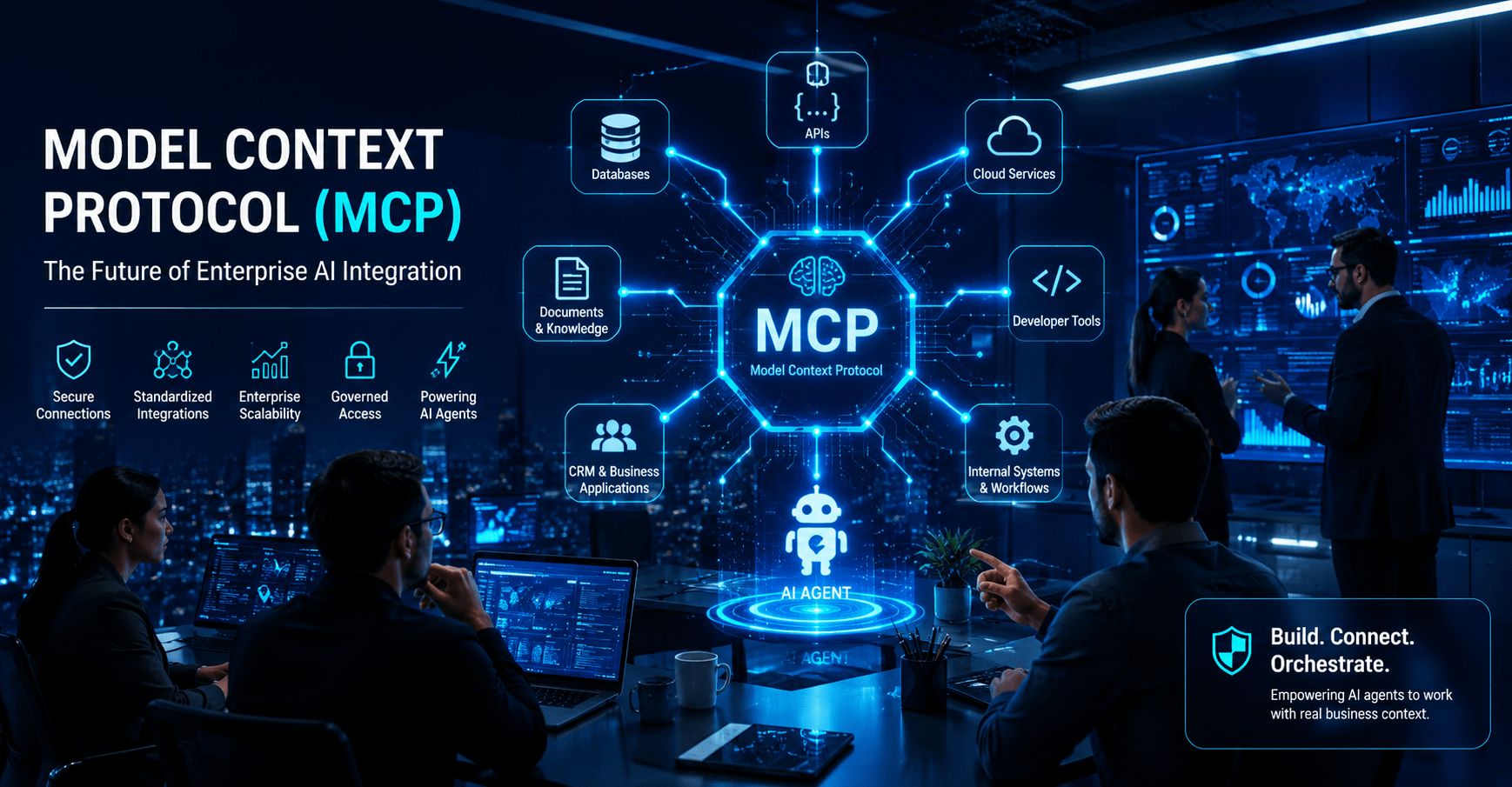
Model Context Protocol (MCP) is an open standard that gives AI applications one consistent way to connect to tools, data and business systems. Instead of building a custom integration for every assistant and every application, enterprises can expose approved capabilities once through MCP servers, which makes AI agents easier to build, govern and scale.
The value of MCP is simple: it gives AI applications a standardized way to interact with external systems. Instead of building custom integrations for every AI tool and every business application, organizations can use MCP as a reusable connection layer for AI-powered workflows.
For enterprise leaders, software architects, and AI teams, MCP is more than a technical protocol. It is part of the foundation for agentic AI — systems that can understand context, use tools, retrieve information, and assist with real business execution.
What Is Model Context Protocol?
Model Context Protocol is an open standard that helps AI applications connect with external tools and data sources in a consistent way. These systems may include databases, cloud platforms, file repositories, CRMs, analytics tools, developer platforms, and internal enterprise applications.
A simple way to understand MCP is to think of it as a bridge between AI models and business systems. Instead of an AI assistant being limited to static knowledge, MCP allows it to securely reach into approved systems, retrieve context, and perform useful actions.
Why MCP Is Becoming Important
AI adoption is moving from experimentation to integration. In the early phase of generative AI, most businesses used AI for writing, summarization, brainstorming, code assistance, and support automation. The next phase is different. Businesses now want AI systems that can take action inside enterprise environments.
That creates a major integration challenge. Every AI assistant needs access to different tools. Every company has different systems. Every department uses different workflows. Without a standard, integration becomes expensive and difficult to maintain.
| Enterprise AI Challenge | How MCP Helps |
|---|---|
| Too many custom integrations | Creates a reusable connection model |
| AI lacks business context | Connects AI applications to approved data sources |
| Tools are fragmented | Standardizes how tools are exposed to AI systems |
| AI pilots do not scale | Supports repeatable enterprise AI architecture |
| Security is difficult to manage | Encourages controlled access patterns |
MCP vs Traditional APIs
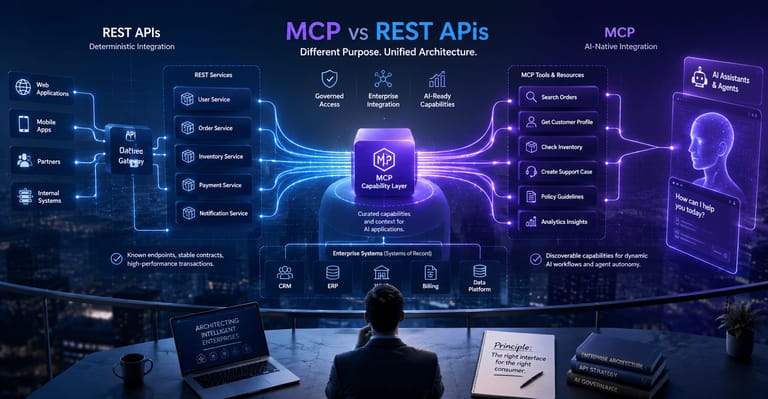
Traditional APIs are still essential. MCP does not replace APIs. Instead, it gives AI applications a more standardized way to discover and use tools, resources, and contextual information that may already be powered by APIs behind the scenes.
In a traditional API model, developers manually connect one application to another. In an MCP model, an AI client can connect to an MCP server and understand what tools, resources, and prompts are available.
| Traditional API | Model Context Protocol |
|---|---|
| Built for application-to-application communication | Built for AI-to-system integration |
| Requires custom integration work | Provides a standardized connection pattern |
| Usually designed for developers | Designed for AI clients, tools, and context access |
| Often tightly coupled | Encourages reusable AI integration layers |
| Good for fixed workflows | Useful for agentic AI and dynamic tool usage |
Core MCP Architecture
MCP architecture is commonly understood through three core parts: the host, the client, and the server. The host is the AI application environment. The client manages the connection. The server exposes tools, resources, or prompts that the AI application can use.
- MCP Host: AI application environment
- MCP Client: connection manager
- MCP Server: exposes tools and resources
- Tools: actions the AI can call
- Resources: context the AI can read
- Prompts: reusable workflow instructions
MCP is not just another integration method. It is an architectural pattern for enterprise AI interoperability.
Enterprise Use Cases for MCP
MCP becomes valuable when AI needs to work with business systems instead of staying inside a chat window. For enterprise teams, this creates opportunities across software development, customer support, operations, finance, marketing, analytics, and knowledge management.
💻 Software Teams
- Connect AI coding assistants to repositories
- Retrieve project documentation
- Analyze issues and pull requests
- Support developer onboarding
📊 Business Operations
- Query internal databases
- Summarize operational reports
- Trigger workflow actions
- Connect to business applications
🔐 Enterprise IT
- Standardize AI tool access
- Control system permissions
- Improve governance visibility
- Reduce unmanaged AI integrations
Why MCP Matters for AI Agents
AI agents need more than language generation. To be useful, they need access to tools, memory, context, permissions, workflows, and external systems. MCP helps create the connection layer that allows agents to operate with relevant context and controlled capabilities.
For example, an AI agent supporting a software team may need to read documentation, inspect a Git repository, check open issues, retrieve deployment status, and summarize production incidents. MCP can help standardize how those capabilities are exposed.
Security and Governance Considerations
MCP introduces powerful capabilities, but enterprise teams must treat it as part of the security architecture. Any system that allows AI applications to access tools and data should be designed with permissions, auditing, identity controls, and human oversight.
| Security Area | Recommended Practice |
|---|---|
| Access Control | Limit tools and resources by role and context |
| Auditability | Log tool calls, data access, and agent actions |
| Data Protection | Prevent sensitive data from being exposed unnecessarily |
| Human Oversight | Require review for high-impact actions |
| Tool Governance | Approve and monitor MCP servers before production use |
Common MCP Implementation Mistakes
As MCP adoption grows, many organizations will make predictable mistakes. Most of these mistakes come from treating MCP as a quick integration shortcut rather than an architectural layer.
- Connecting too many tools too quickly
- Ignoring access permissions
- No audit trail for AI actions
- Using unapproved MCP servers
- No human approval for sensitive workflows
- Treating MCP as a proof-of-concept only
Industries That Can Benefit from MCP
MCP has broad relevance wherever AI needs to interact with enterprise data and business systems. The strongest early opportunities are likely in industries with complex workflows, fragmented systems, and high knowledge-processing needs.
| Industry | MCP Opportunity |
|---|---|
| Software Development | Extremely High |
| Financial Services | Very High |
| Healthcare | High |
| Legal Operations | High |
| Enterprise IT | Very High |
| Customer Support | Very High |
| Media & Research | High |
| Retail Operations | Growing Rapidly |
Final Thoughts
Model Context Protocol is emerging because enterprise AI needs a stronger integration foundation. As AI agents become more capable, businesses need a standard way to connect those agents with tools, data, systems, and workflows.
The organizations that adopt MCP thoughtfully will be better positioned to build scalable AI assistants, AI-powered software tools, enterprise automation workflows, and agentic systems that operate with real business context.
MCP is not just a developer trend. It is a signal that AI architecture is moving from isolated tools toward connected enterprise intelligence.
Frequently asked questions
What is Model Context Protocol (MCP)?
An open standard that lets AI applications connect to external tools and data sources, such as databases, file stores, CRMs and developer platforms, in a consistent way.
How does MCP architecture work?
An MCP host is the AI application environment, an MCP client manages the connection, and an MCP server exposes the tools, resources or prompts that the AI application can use.
Is MCP secure for enterprise use?
It can be, if it is designed as part of the security architecture: limit tools by role and context, authenticate every connection, log actions and keep humans in the loop for sensitive operations.